Why I Built Lochy Image Scanner
By Artur Kraft • 8 minutes read •
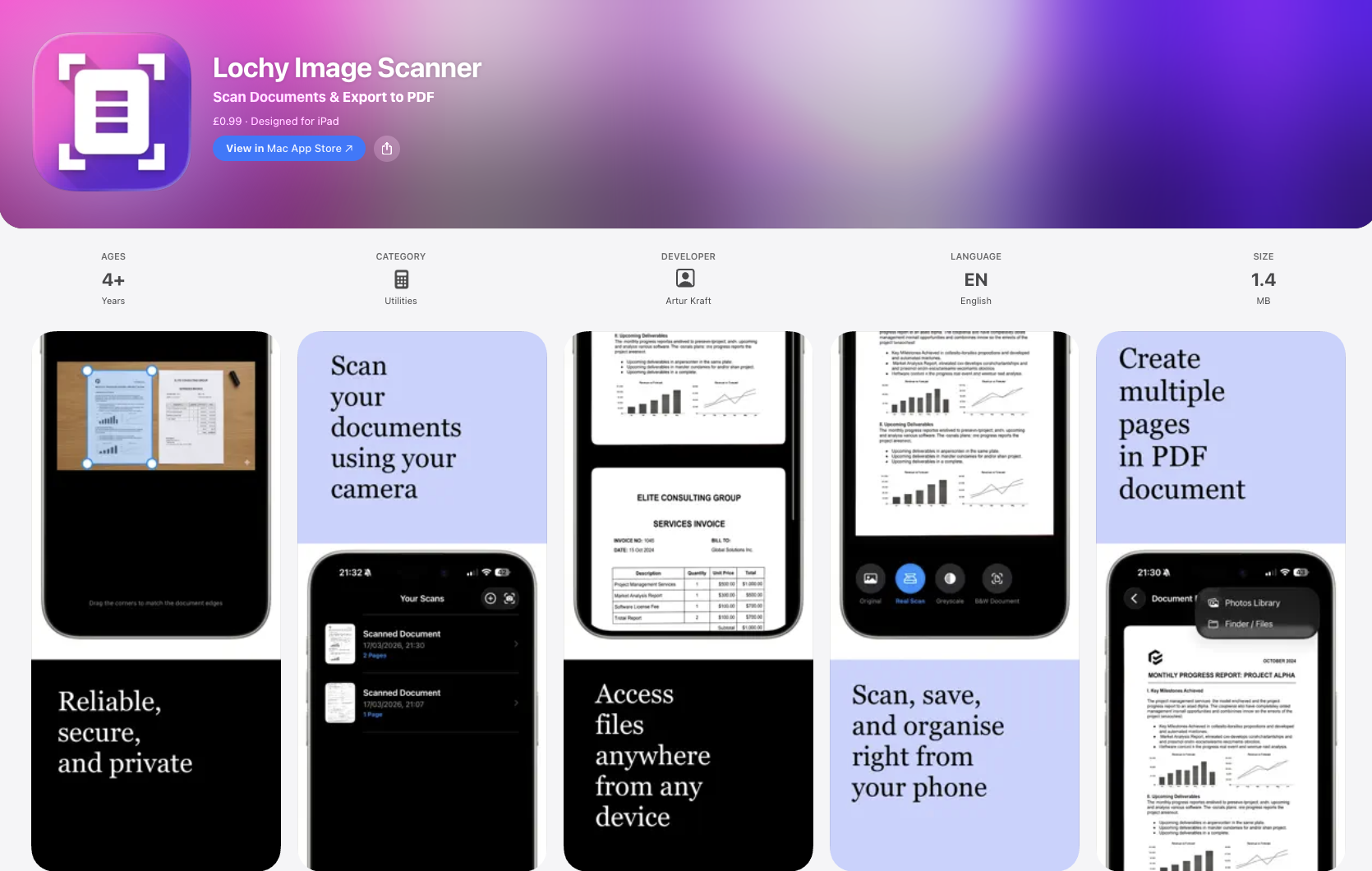
A little side project of mine that I’m genuinely happy with is Lochy Image Scanner — my lightweight iPhone app for scanning documents, turning photos into PDFs, and cleaning pages up properly without all the nonsense that so many apps seem to come with these days.
You can get it here: Lochy Image Scanner on the App Store
Why I made it
I created Lochy Image Scanner for a very simple reason: I needed a good, straightforward document scanning app again.
For a long time, Microsoft Lens was one of those apps that just sat there on my phone and quietly did its job. Then it disappeared from the App Store, and that left a bit of a gap. There are still plenty of scanning apps around, of course, but far too many of them feel bloated, overcomplicated, or built around pushing people into subscriptions for basic features that really should just work.
That annoyed me enough that I decided to build my own.
I didn’t want to make “yet another app” with dark patterns, constant upsells, ad banners everywhere, or some weird account system for scanning a receipt. I wanted something small, fast, and pleasant to use. Something that launches quickly, does the job well, and gets out of the way.
So that’s exactly what I built.
What it is
Lochy Image Scanner is an iOS app that lets you:
- Take photos of documents and turn them into PDF files.
- Import existing photos of documents from your library.
- Edit documents page by page.
- Apply filters to improve readability.
- Use a more advanced photo editor when you want finer control.
In other words, it covers the things most people actually need from a scanner app, without trying to become some giant enterprise document platform.
For me, that was a big part of the appeal. I wanted it to feel focused.
A lot of modern apps try to do everything at once and end up feeling heavy, slow, and weirdly stressful to use. Lochy Image Scanner is meant to be the opposite of that. Open it, scan, tweak, export, done.
No subscription, no ads, no tracking
This bit matters to me quite a lot.
Lochy Image Scanner is available for a small one-off fee. That’s it. No subscription. No “7-day free trial” trap. No unlocking basic features later. No ads. No tracking.
I know that subscriptions make sense for some kinds of apps, especially where there are ongoing cloud costs or constantly changing online services behind the scenes. But not every app needs to become a monthly bill.
For this kind of utility app, I much prefer the older, simpler model: you buy it once, and it works.
I also really dislike the amount of tracking that has become normal in apps that honestly have no reason to know that much about their users. A scanner app does not need to behave like an ad-tech company. I wanted Lochy to feel respectful in that sense too.
You open it to scan documents, not to be profiled.
Built the way I like software to feel
I built the app using the latest Apple libraries and SwiftUI, which is a huge part of why it feels so lightweight and modern.
I genuinely enjoy building in SwiftUI. When it clicks, it allows you to create interfaces that feel clean, responsive, and very natural on Apple devices. It also makes it easier for me to keep the app modern and maintainable rather than dragging around piles of legacy UI code just for the sake of it.
The goal from the start was not just to make the app functional, but to make it feel good.
That means:
- Fast launch times.
- Smooth navigation.
- A simple interface.
- Minimal friction between opening the app and finishing the task.
I’m a big believer that utility apps should feel almost invisible. If you have to think too much while using them, something has gone wrong. The best tools are often the ones that quietly stay out of your way.
Why lightweight matters
I think lightweight software is underrated.
There’s a lot of talk in tech about features, integrations, AI this and AI that, but sometimes what people really want is an app that does one thing well and does it quickly. That’s especially true on mobile.
If I need to scan a document, I don’t want to wait while an app loads a dozen analytics frameworks, checks in with five services, or throws pop-ups at me before I can even use the camera. I want to point the phone, capture the page, tidy it up, export it as a PDF, and move on with my day.
That’s the kind of experience I wanted Lochy Image Scanner to have.
Small. Fast. Clean. Useful.
There’s something really satisfying about software that respects your time.
Editing documents properly
One thing I didn’t want to compromise on was editing.
A lot of scanner apps let you capture pages, but then give you very little control afterwards. If one page is a bit wonky, too dark, slightly cropped badly, or just looks off compared to the others, the whole document feels messy.
So in Lochy Image Scanner, I wanted page-level editing to be part of the core experience, not an afterthought.
That means you can go through a document page by page and improve it properly. If one page needs a filter and another needs a bit more attention, you can handle that without fighting the app. And if you want more control, there’s an advanced photo editor there too.
That flexibility matters because real-life document scanning is rarely perfect. Lighting changes. Angles are awkward. Some pages are clean and some are creased. Receipts are a pain. Paper isn’t always flat. You need an app that helps fix those little imperfections rather than locking you into whatever came out of the camera the first time.
Why PDF creation still matters
PDFs might not be glamorous, but they are still incredibly useful.
People still need to send forms, invoices, signed paperwork, ID documents, receipts, notes, contracts, and all sorts of other things in a format that is easy to share and looks consistent. A good scanning app makes that whole process much less painful.
That’s another reason I wanted Lochy Image Scanner to be straightforward about turning images into proper PDF documents. For something so common, it’s surprisingly easy to end up with a clunky workflow in other apps.
I wanted mine to be simple enough that anyone could just pick it up and use it without a learning curve.
A small app on purpose
I actually like making software that knows what it is.
Lochy Image Scanner is not trying to become a giant platform. It is not trying to trap people in an ecosystem. It is not trying to extract maximum revenue from a basic utility.
It is a small, focused app made to solve a common problem well.
There’s a lot of freedom in building like that. You can make decisions around clarity and usefulness instead of constantly asking how to make the product more addictive, more “engaging”, or more monetisable.
That approach probably won’t appeal to every startup pitch deck on earth, but I think it leads to better software.
And honestly, I just enjoy using apps that feel like they were made by somebody who cared about the experience.
Who it’s for
I made Lochy Image Scanner for people like me, really:
- People who want a quick scanner app on their iPhone.
- People who do not want subscriptions for basic utilities.
- People who hate ads in productivity apps.
- People who care about privacy.
- People who just want to scan documents, improve them a bit, and export them as PDFs without drama.
It’s also handy for small business owners, freelancers, students, parents, anyone dealing with paperwork, and honestly anyone who occasionally needs to turn a physical page into something clean and shareable.
Which is most of us, sooner or later.
Building it was fun
This app was also just a fun thing to build.
I like working on products that are clear in purpose. There’s something refreshing about sitting down and asking, “What would make this genuinely good?” instead of “How can this be stretched into something bigger than it needs to be?”
Working with the latest iOS tools and SwiftUI, shaping the interface, keeping the app lean, making sure the document flow felt natural — all of that was the enjoyable part for me.
It’s one of those projects where the idea started from a genuine gap in my own day-to-day use, and those are often the best ones. You notice something missing, you get slightly irritated about it, and then instead of just complaining, you go and build the thing you wish existed.
Final thoughts
So that’s the story behind Lochy Image Scanner.
I wanted a proper document scanning app again after Microsoft Lens disappeared from the App Store. I wanted it to be fast, lightweight, modern, and respectful. I wanted no subscriptions, no ads, no tracking, and no unnecessary nonsense. Just a solid iPhone app that lets you scan documents, import images, edit pages, apply filters, use an advanced editor, and export neat PDF files.
And that’s exactly what I made.
If that sounds like your kind of app, you can download it here:
Comments
You can comment on this blog post by publicly replying to this post using a Mastodon or other ActivityPub/Fediverse account. Known non-private replies are displayed below.